Harvard Resume Template (Free, One Column)
The Harvard-style resume is the plain, black-and-white format that university career offices hand to students: one column, centred name, Education first, and each entry laid out with the organisation and location on one line and your role and dates on the next. MakeCV's Harvard template follows that structure so you get the look without fighting a word processor.
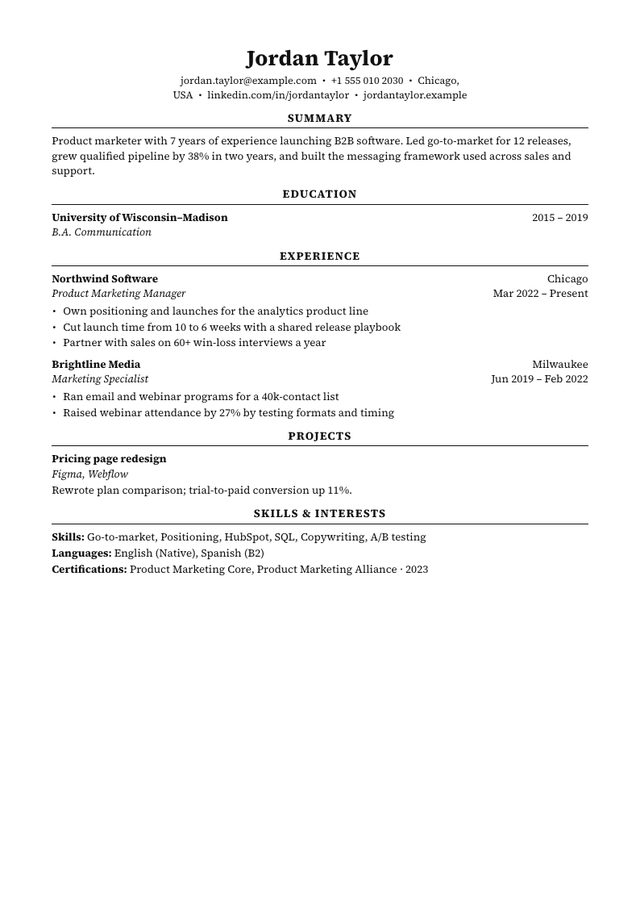
- Layout: One column, Education first
- Photo: No photo area
- Look: Black only, Source Serif, centred headings with rules
- Suits: Students and graduates, finance, consulting, law, academia-adjacent roles
The rules of the format
- One column, black text, no graphics. No icons, no colour, no photo. The structure does the work.
- Centred name, one contact line. Email, phone, city and LinkedIn on a single line under your name, separated by dots.
- Centred section headings with a rule. Education, Experience, Projects, then Skills & Interests.
- Two-line entry headers. Line one: organisation in bold, location on the right. Line two: your role in italics, dates on the right. Then bullet points.
- Bullets that start with a verb and end with a result. "Built a pricing model used by three product teams", not "Responsible for pricing".
- One page for students and anyone with under about ten years of experience.
MakeCV builds those lines for you. Write one achievement per line in the Responsibilities box and each line becomes a bullet; dates are formatted the same way everywhere ("Mar 2022 – Present").
Who the Harvard template suits
It is a strong default for students and graduates, and for conservative fields where a plain document reads as confident rather than dull: finance, consulting, law, policy and research. Because it is a single column with standard headings, it is also one of the safest layouts for online application portals.
It is a weaker fit when your strongest asset is recent work experience (Education first pushes it down the page) or when the employer expects a photo. In those cases:
- Classic or Compact: one column with Experience first.
- Professional: two columns with an optional photo.
- Student: the same Education-first idea with a little colour and a Projects section near the top.
How to fill it in
- Education: university and dates on the first line, degree on the second. Use the notes field for GPA (if strong), honours, or two or three relevant courses.
- Experience: internships, part-time jobs and full-time roles, most recent first. Three or four bullets each.
- Projects: research, competitions, society roles or personal projects. The Harvard format often calls this "Leadership & Activities"; MakeCV labels it Projects.
- Skills & Interests: filled automatically from your skills, languages and certifications, each on its own line.
A summary is optional in this format. If you add one, keep it to two lines; see summary examples.
Download tip: for online applications use ATS PDF (print dialog → Save as PDF). The Harvard template is already plain black text, so the ATS PDF looks identical to the preview and keeps every word machine-readable. How ATS reads your resume.