Professional Resume Template (Two-Column, Free)
A professional resume template should look confident without getting in the way of what you have done. MakeCV's Professional template does that with a two-column layout: a wide main column for your profile, experience, education and projects, and a light sidebar on the right for contact details, skills, languages and certifications. A square photo is optional and sits top right; skip it and the space simply closes up.
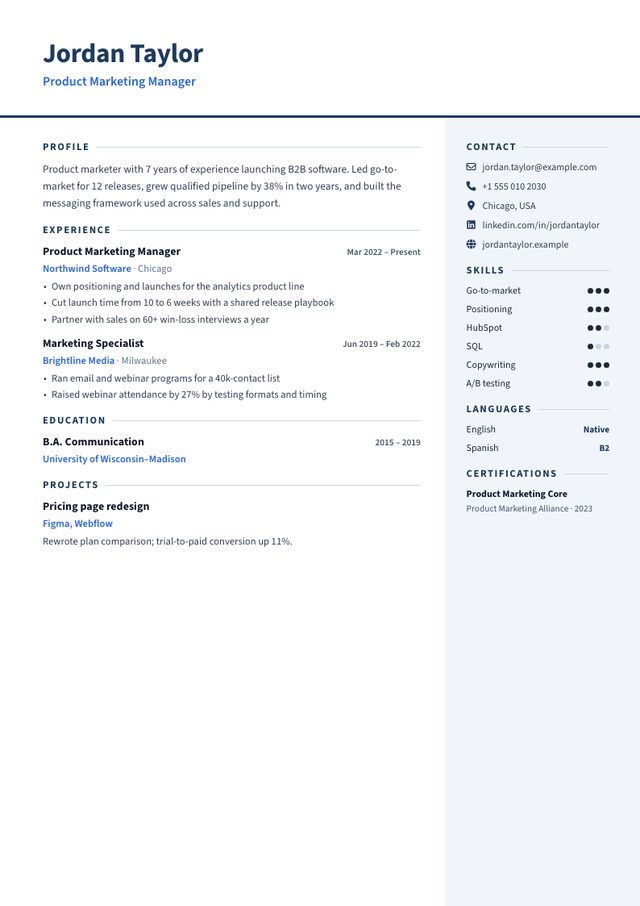
- Layout: Main column + light right sidebar
- Photo: Optional, square, top right (nothing shown if you skip it)
- Look: Navy and blue, Source Sans, skill-level dots
- Suits: Corporate roles in any industry: sales, operations, HR, finance, project management
When a two-column resume works
- You have a lot of short items. Skills, languages and certifications fit neatly in the sidebar instead of taking full-width lines, so more of your experience fits on one page.
- A person reads it first. Recruiters, hiring managers and referrals open the PDF directly; the layout lets them find your contact details and key skills at a glance.
- You want something more polished than a plain document but more restrained than a creative design. Navy and blue on white suits sales, operations, HR, finance and project management.
The ATS question
Applicant tracking systems convert your PDF to text before anyone reads it. Two-column layouts carry a little more risk than one column, because a parser may read across both columns. The Professional template keeps that risk low: everything with sentences (profile, experience, education, projects) is in the main column, and the sidebar holds only short labelled items.
Two files, one minute: download Professional with Download PDF for email and referrals, then switch to Harvard or Classic and save an ATS PDF for portals such as Workday or Taleo. Your details carry over, so there is nothing to retype. More in the ATS resume guide.
How to fill it in
- Profile: two to four sentences at the top of the main column: your role, years of experience, one measurable result, and what you want next. See summary examples.
- Experience: one achievement per line, starting with a verb. Each line becomes a bullet, and dates line up on the right.
- Skills: six to ten, each one to three words. Set a level for each; the template shows it as one to three dots. Keep the names matched to the job advert, since that is what a parser reads.
- Certifications: name, issuer and year. Recent and relevant ones only.
Professional vs Modern
| Professional | Modern | |
|---|---|---|
| Sidebar | Light grey, on the right | Dark navy, on the left |
| Header | Full-width name and title, photo top right | Name and photo inside the sidebar |
| Skill levels | One to three dots | Bars |
| Ink on paper | Light | Heavy |
| ATS (our assessment) | Good | Fair |