Simple Resume Template (Free, One Column)
A simple resume template does one job: it gets your experience read. MakeCV's Classic template is our simplest layout, with a single column, standard section headings and one accent colour. It is the template we recommend when you are not sure what the employer uses to screen applications.
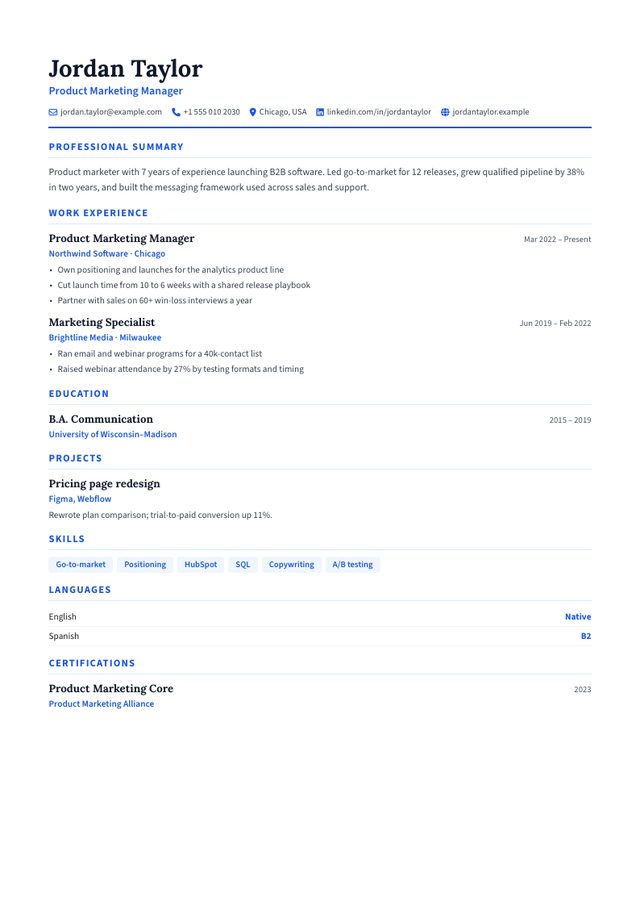
- Layout: One column
- Photo: Optional, round (nothing shown if you skip it)
- Look: Serif name, blue accents, white page
- Suits: Accounting, law, teaching, public sector, first jobs
What makes a resume template "simple"
"Simple" is not about having less content. It is about removing everything that makes the content harder to read, for people and for software:
- One reading column. Text flows top to bottom in the same order a parser extracts it, so nothing gets shuffled.
- Standard headings. Classic uses "Professional Summary", "Work Experience", "Education", "Projects", "Skills", "Languages" and "Certifications": the labels applicant tracking systems look for.
- Dates in one consistent place. Every job shows its date range on the right of the job-title line, in the same format ("Mar 2022 – Present").
- Two typefaces at most. Classic pairs a serif for your name and job titles with a sans-serif for body text.
- No tables, text boxes or skill bars, which are the elements most likely to confuse a parser.
Need more room? Compact
If your experience runs past one page in Classic, try Compact. It is still a single column with standard headings, but section labels sit in a narrow left margin, type is a little smaller and spacing is tighter, so a long career fits on one page without cutting content. Skills and languages run inline instead of as tags.
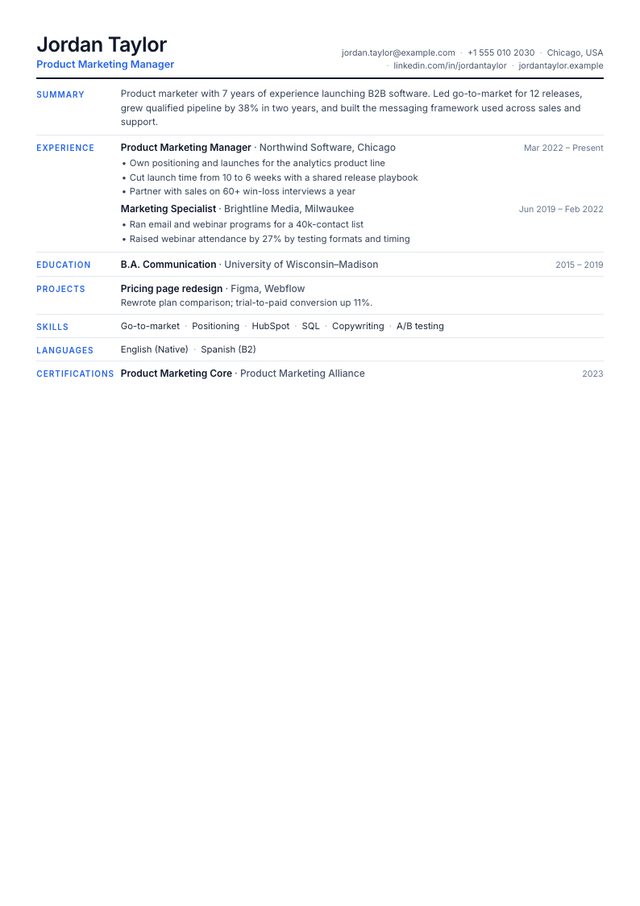
- Layout: One column, section labels in a left margin
- Photo: No photo area
- Look: Dense Inter type, thin rules, blue labels
- Suits: Experienced candidates who need everything on one page
When a simple template is the right choice
Choose Classic (or its black-and-white cousin, Minimalist) when:
- You are applying through a company careers portal or a job board's "easy apply" form, where an ATS is almost certainly involved.
- The industry is conservative: accounting, law, banking, insurance, healthcare administration, government and teaching.
- You are writing your first resume. A simple layout keeps attention on what you have done rather than on how much space is left over. Our no-experience resume guide covers what to put in it.
- You will send the same file to many employers and cannot tailor the design to each one.
A more designed template can make sense when you are emailing a hiring manager directly, applying for a creative role, or handing a printed copy over at a career fair. Even then, many people keep a simple version as a backup.
How to fill in the Classic template well
Header
Use the name you want to be called, a job title that matches the role you are applying for (not necessarily your current title), a professional email, a phone number with country code if you apply abroad, and your city and country. Add LinkedIn if your profile is up to date.
Professional summary
Two to four sentences: who you are professionally, your strongest relevant result, and what you want next. The builder suggests 300–500 characters, which is about three lines on the page. Our resume summary examples show the pattern.
Work experience
For each job, write two to four lines that start with an action verb and include a number wherever you honestly can (people, money, time, volume). The template keeps each description as a paragraph, so separate achievements with full stops rather than trying to force bullet characters.
Skills
Classic displays skills as simple tags without level bars, which is the safest format for ATS keyword matching. List the tools and techniques named in the job advert that you genuinely have. See how to choose resume skills.
Simple doesn't mean sparse: common mistakes
Fill one full page. If you have ten or more years of experience, two pages are fine.
Leave half the page empty. A short resume in a simple template looks unfinished; add projects, certifications or a stronger summary.
Keep descriptions to two to four lines per job so the page stays scannable.
Paste long paragraphs from your job description. Recruiters skim; walls of text get skipped.
Download it the right way
MakeCV gives you two PDF buttons. Download PDF produces a pixel-perfect copy of the preview, but it is rendered as an image, so its text cannot be selected or parsed. ATS PDF opens your browser's print dialog; choose "Save as PDF" and you get a text-based file. For online applications, use the ATS PDF. The ATS guide explains why.