Student Resume Template for Your First Job
When you are a student or recent graduate, your degree and what you have built are your best evidence, not a long list of jobs. MakeCV's Student template is built around that: Education first, Projects second, then Experience, in a single clean column with a calm teal accent. It works for internships, part-time jobs, graduate schemes and first full-time roles.
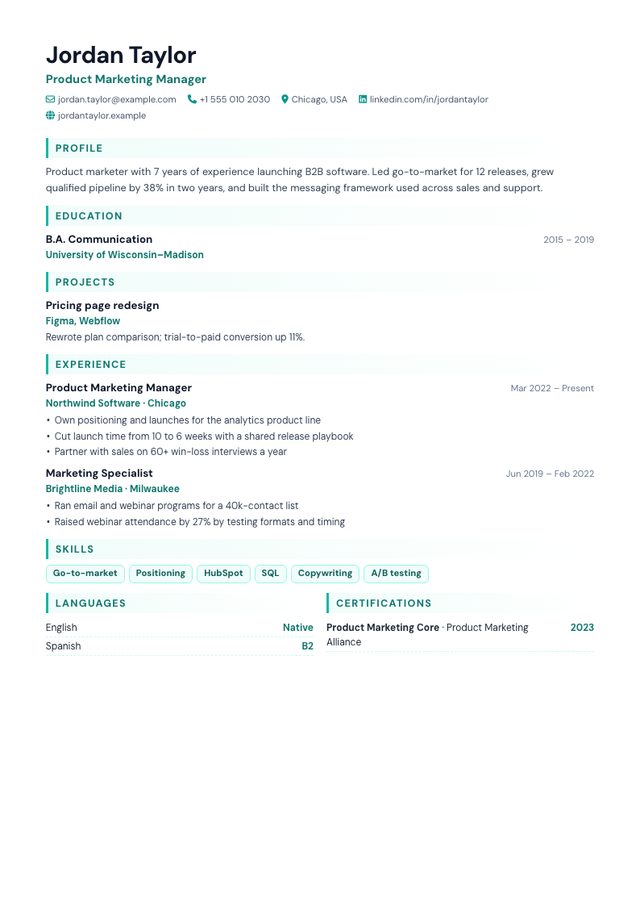
- Layout: One column, Education and Projects first
- Photo: Optional, round (nothing shown if you skip it)
- Look: DM Sans, teal accents, skill tags
- Suits: Students, graduates, internships, part-time and first jobs
Why the section order matters
Recruiters skim the top third of a page first. On a typical student resume that space is better spent on your course and your projects than on a weekend job. The Student template orders sections for that reader:
- Profile: two or three sentences on what you study, one result you are proud of, and the role you want.
- Education: degree or school, dates (use the expected year if you have not finished), and a notes line for grades, honours or relevant modules.
- Projects: coursework, hackathons, societies, research or personal projects, with the tools you used and a link if you have one.
- Experience: part-time work, internships, volunteering and informal work. All of it counts.
- Skills, then Languages and Certifications side by side to save space.
What to write when you have little experience
- Turn coursework into projects. "Built a budgeting app in a team of four for a software engineering module; presented it to 40 classmates" is a project with a role and a result.
- Describe informal work like a job. Tutoring, babysitting, helping in a family business or running a small online shop show reliability and responsibility.
- Write one achievement per line. Each line becomes a bullet. Start with a verb and add a number where you honestly can.
- Pick skills that match the advert. Six to ten is plenty; see skills for your resume.
The full guide to writing a resume with no experience has examples for each section.
Student vs Harvard
Both put Education first and both are single-column and ATS-safe. Harvard is strictly black and white with centred headings, the traditional choice for finance, consulting and law. Student adds a small amount of colour, a photo option for countries where photos are expected, and puts Projects above Experience, which suits technical, creative and early-career applicants better.
Photo or no photo?
Leave it out for applications in the US, Canada, the UK and Ireland. In parts of continental Europe a photo is still common. If you don't upload one, the template simply has no photo area: nothing empty is left on the page.